💻 Research
How to HKMC Gen5W Firmware Decryption?
How to HKMC Gen5W Firmware Decryption?
Overview
Last year, a tool was released that allowed users to extract HKMC(Hyundai KIA Motors Group) Gen5W firmware. (@galaxy4public)
https://github.com/galaxy4public/hkmcavn-toolsgithub.comThis tool is made to work with the firmware of Head Unit products designed by LGE.
Available Target
- (AU) 2022-23 Sportage
- (AU) 2021-23 IONIQ5
- …
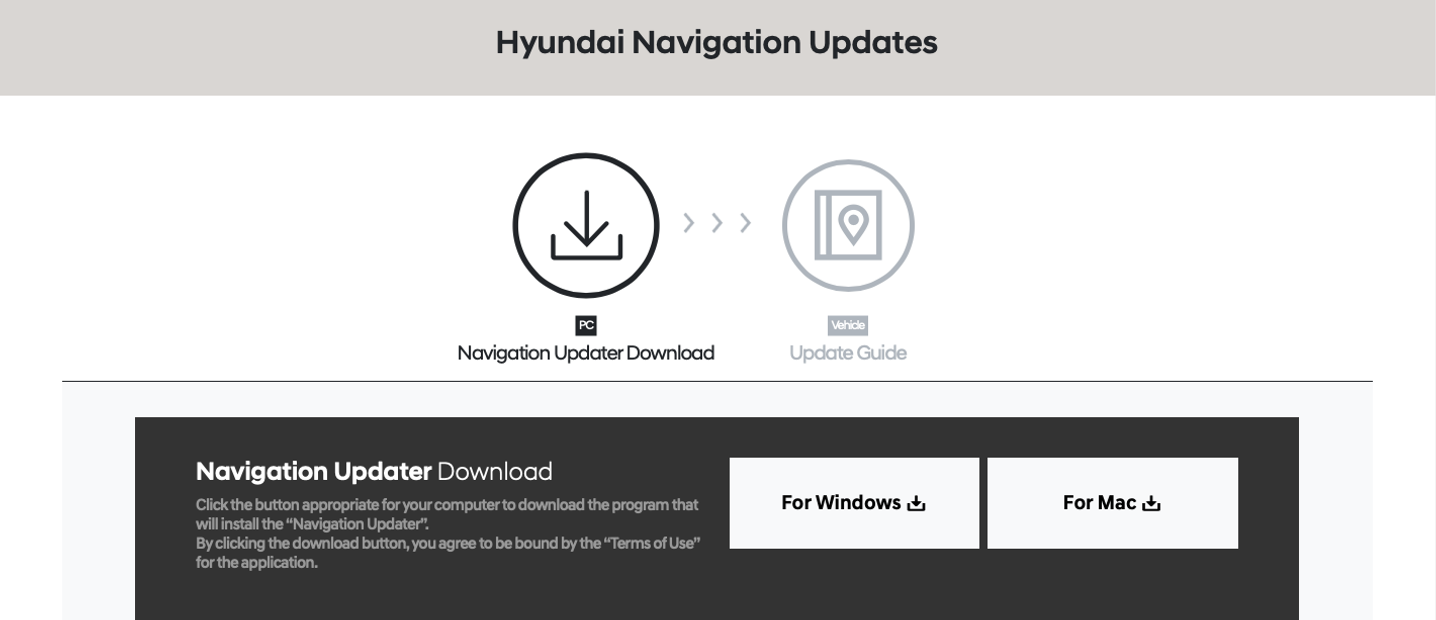
Download Navigation Updater
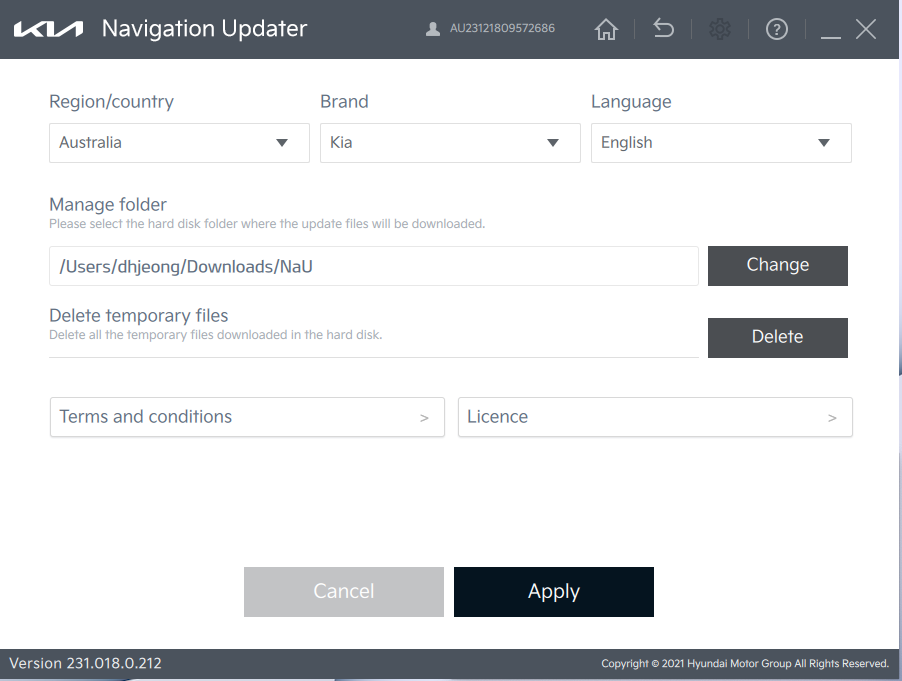
Settings for Navigation Updater
By selecting the Hyundai or KIA brand from the main screen and entering a non-member login, you can view the settings screen below.
Go back to the screen and select the type of car and the year that you would like to download.
![[Figure 3] Settings for Vehicle Model](https://prod-files-secure.s3.us-west-2.amazonaws.com/ddfb90e3-766a-4fa2-b58c-bd09d4b4e865/59b01a68-f5cc-4363-b0cf-ccee8e0592f1/3.png?X-Amz-Algorithm=AWS4-HMAC-SHA256&X-Amz-Content-Sha256=UNSIGNED-PAYLOAD&X-Amz-Credential=ASIAZI2LB466VKL3IRW7%2F20261011%2Fus-west-2%2Fs3%2Faws4_request&X-Amz-Date=20261011T231209Z&X-Amz-Expires=3600&X-Amz-Security-Token=IQoJb3JpZ2luX2VjEK%2F%2F%2F%2F%2F%2F%2F%2F%2F%2F%2FwEaCXVzLXdlc3QtMiJFMEMCH19TSrLluU7RWkleCAGNNptorWp9CqCW2h6VizFrNzMCIHkCltP6XHy3WO0%2FhFFbPSS1uPV0aHl%2Bvgw9t3pohKa9Kv8DCHcQABoMNjM3NDIzMTgzODA1Igyj17ZfsBBaAGPXL9oq3AMGLGMkGsfQLPJ0%2B6hDDtd0zFFk7HNZLnN7KlNQg5Tvsv1OVDiy3Jjws5cJwqKgkjDJmr50bivAmDyStml0FNB%2FXOmdCO1cP0Lk4FvLvlFNeHrA8YTBj%2FLhDJlEF8Q25TFl%2BycbkhchQ6P9OHWquey%2FIKe6rBMWpfSaFGBErHKtPZUkQVeGHnk%2Fw7juMlD9aC5AKdRcgzKRE3Idz5evaampbOb0xwms1%2BNAMuaDJV1VgOvHUjRUFNaWg0L0j%2BAVYDe3fsJyQuBm8p9HO%2BN1cP9ks0%2F2P%2FMmZz9q5kbVx0kGS0fQVkErR438dMxWOT0rsObl%2FAromASQij2%2FOFQVcfY4I3iDRLwplO406bm1bKKzPcEB3%2FDGAvzmM2Z%2B0t%2B04OyOtIJQgd8QLC4Mc8p6hrFc62YZC1XGD4V8IR9dJcKpwvp6NhLQntIWzCSrgQ82byAdA4B0%2FZvcwIXpRP0AExGdZkpH3WKyvk2p3kfq7PGW9a7nGlKJT9PcwBHfTsGe2QNsLiJcvsfRqbXaCez%2FP%2BIh3Khpzd1HXPju4plDqTWmTCzyg3PAaUOwGOfKnzkOK7HyCTqKMLjVZ2C9OZexsCVWozNMRMMqLE9UoCI7G7YtMUbRBbwqxWUBJ3pC9DCCoLDWBjqnAVBRIBkjQcHEBzJnZflYoAIzRsOxOMfEuZTS1mDRZpwqq9oclMy9jsY3f2kW6lbVY7Sq2m1fIkbqJyLIIIoAZRzZx7kmdfGwPnxFdPLHRcyGZeKMWtzTLodtsPTXoTf67TXjev4hFCnDsAez%2Fs5v6lV1lRuCC9ixQdeqLLUB2DqcOOg4YadTPbbH8R77Y%2B80JevGND%2FXmUaNOX4QI5PKrtL7OnQgUhC7&X-Amz-Signature=4f6c1e962b0a7eb53e5f0a1a74a7f81fd628d06e54d7ec91615d64a987896633&X-Amz-SignedHeaders=host&x-amz-checksum-mode=ENABLED&x-id=GetObject)
Select OK on the previous screen to advance to the next screen, where you can specify the path to download the firmware file.
This path can be set by you and can be any path that identify your location.
![[Figure 4] Settings for Download Location](https://prod-files-secure.s3.us-west-2.amazonaws.com/ddfb90e3-766a-4fa2-b58c-bd09d4b4e865/e2ff6247-16de-44dd-a214-6c08c842f274/4.png?X-Amz-Algorithm=AWS4-HMAC-SHA256&X-Amz-Content-Sha256=UNSIGNED-PAYLOAD&X-Amz-Credential=ASIAZI2LB466VKL3IRW7%2F20261011%2Fus-west-2%2Fs3%2Faws4_request&X-Amz-Date=20261011T231209Z&X-Amz-Expires=3600&X-Amz-Security-Token=IQoJb3JpZ2luX2VjEK%2F%2F%2F%2F%2F%2F%2F%2F%2F%2F%2FwEaCXVzLXdlc3QtMiJFMEMCH19TSrLluU7RWkleCAGNNptorWp9CqCW2h6VizFrNzMCIHkCltP6XHy3WO0%2FhFFbPSS1uPV0aHl%2Bvgw9t3pohKa9Kv8DCHcQABoMNjM3NDIzMTgzODA1Igyj17ZfsBBaAGPXL9oq3AMGLGMkGsfQLPJ0%2B6hDDtd0zFFk7HNZLnN7KlNQg5Tvsv1OVDiy3Jjws5cJwqKgkjDJmr50bivAmDyStml0FNB%2FXOmdCO1cP0Lk4FvLvlFNeHrA8YTBj%2FLhDJlEF8Q25TFl%2BycbkhchQ6P9OHWquey%2FIKe6rBMWpfSaFGBErHKtPZUkQVeGHnk%2Fw7juMlD9aC5AKdRcgzKRE3Idz5evaampbOb0xwms1%2BNAMuaDJV1VgOvHUjRUFNaWg0L0j%2BAVYDe3fsJyQuBm8p9HO%2BN1cP9ks0%2F2P%2FMmZz9q5kbVx0kGS0fQVkErR438dMxWOT0rsObl%2FAromASQij2%2FOFQVcfY4I3iDRLwplO406bm1bKKzPcEB3%2FDGAvzmM2Z%2B0t%2B04OyOtIJQgd8QLC4Mc8p6hrFc62YZC1XGD4V8IR9dJcKpwvp6NhLQntIWzCSrgQ82byAdA4B0%2FZvcwIXpRP0AExGdZkpH3WKyvk2p3kfq7PGW9a7nGlKJT9PcwBHfTsGe2QNsLiJcvsfRqbXaCez%2FP%2BIh3Khpzd1HXPju4plDqTWmTCzyg3PAaUOwGOfKnzkOK7HyCTqKMLjVZ2C9OZexsCVWozNMRMMqLE9UoCI7G7YtMUbRBbwqxWUBJ3pC9DCCoLDWBjqnAVBRIBkjQcHEBzJnZflYoAIzRsOxOMfEuZTS1mDRZpwqq9oclMy9jsY3f2kW6lbVY7Sq2m1fIkbqJyLIIIoAZRzZx7kmdfGwPnxFdPLHRcyGZeKMWtzTLodtsPTXoTf67TXjev4hFCnDsAez%2Fs5v6lV1lRuCC9ixQdeqLLUB2DqcOOg4YadTPbbH8R77Y%2B80JevGND%2FXmUaNOX4QI5PKrtL7OnQgUhC7&X-Amz-Signature=3353648061886ff03b4053a69c5073e21ea9b1b3b51f5d7b21d80060cf4b8533&X-Amz-SignedHeaders=host&x-amz-checksum-mode=ENABLED&x-id=GetObject)
Once the path is selected, a /Nau directory is created and the selected firmware is downloaded into the directory.
The download time is approximately 1-3 minutes, but may vary depending on the network speed in your country.
![[Figure 5] Downloading Firmware](https://prod-files-secure.s3.us-west-2.amazonaws.com/ddfb90e3-766a-4fa2-b58c-bd09d4b4e865/f7e6b580-eb10-491b-a192-479c5be0943f/5.png?X-Amz-Algorithm=AWS4-HMAC-SHA256&X-Amz-Content-Sha256=UNSIGNED-PAYLOAD&X-Amz-Credential=ASIAZI2LB466VKL3IRW7%2F20261011%2Fus-west-2%2Fs3%2Faws4_request&X-Amz-Date=20261011T231209Z&X-Amz-Expires=3600&X-Amz-Security-Token=IQoJb3JpZ2luX2VjEK%2F%2F%2F%2F%2F%2F%2F%2F%2F%2F%2FwEaCXVzLXdlc3QtMiJFMEMCH19TSrLluU7RWkleCAGNNptorWp9CqCW2h6VizFrNzMCIHkCltP6XHy3WO0%2FhFFbPSS1uPV0aHl%2Bvgw9t3pohKa9Kv8DCHcQABoMNjM3NDIzMTgzODA1Igyj17ZfsBBaAGPXL9oq3AMGLGMkGsfQLPJ0%2B6hDDtd0zFFk7HNZLnN7KlNQg5Tvsv1OVDiy3Jjws5cJwqKgkjDJmr50bivAmDyStml0FNB%2FXOmdCO1cP0Lk4FvLvlFNeHrA8YTBj%2FLhDJlEF8Q25TFl%2BycbkhchQ6P9OHWquey%2FIKe6rBMWpfSaFGBErHKtPZUkQVeGHnk%2Fw7juMlD9aC5AKdRcgzKRE3Idz5evaampbOb0xwms1%2BNAMuaDJV1VgOvHUjRUFNaWg0L0j%2BAVYDe3fsJyQuBm8p9HO%2BN1cP9ks0%2F2P%2FMmZz9q5kbVx0kGS0fQVkErR438dMxWOT0rsObl%2FAromASQij2%2FOFQVcfY4I3iDRLwplO406bm1bKKzPcEB3%2FDGAvzmM2Z%2B0t%2B04OyOtIJQgd8QLC4Mc8p6hrFc62YZC1XGD4V8IR9dJcKpwvp6NhLQntIWzCSrgQ82byAdA4B0%2FZvcwIXpRP0AExGdZkpH3WKyvk2p3kfq7PGW9a7nGlKJT9PcwBHfTsGe2QNsLiJcvsfRqbXaCez%2FP%2BIh3Khpzd1HXPju4plDqTWmTCzyg3PAaUOwGOfKnzkOK7HyCTqKMLjVZ2C9OZexsCVWozNMRMMqLE9UoCI7G7YtMUbRBbwqxWUBJ3pC9DCCoLDWBjqnAVBRIBkjQcHEBzJnZflYoAIzRsOxOMfEuZTS1mDRZpwqq9oclMy9jsY3f2kW6lbVY7Sq2m1fIkbqJyLIIIoAZRzZx7kmdfGwPnxFdPLHRcyGZeKMWtzTLodtsPTXoTf67TXjev4hFCnDsAez%2Fs5v6lV1lRuCC9ixQdeqLLUB2DqcOOg4YadTPbbH8R77Y%2B80JevGND%2FXmUaNOX4QI5PKrtL7OnQgUhC7&X-Amz-Signature=4708fcf7f0402f519ceaec442f3edf084b7183798afe7d767cfa1320cb86a8b0&X-Amz-SignedHeaders=host&x-amz-checksum-mode=ENABLED&x-id=GetObject)
Identifying firmware
When the firmware download is complete, a directory called Nau will be created in the path you specify, and within that directory will be a subdirectory

![[Figure 6, 7] Downloaded Firmware](https://prod-files-secure.s3.us-west-2.amazonaws.com/ddfb90e3-766a-4fa2-b58c-bd09d4b4e865/88357d71-f17a-44b6-b18f-9991d50debf7/7.png?X-Amz-Algorithm=AWS4-HMAC-SHA256&X-Amz-Content-Sha256=UNSIGNED-PAYLOAD&X-Amz-Credential=ASIAZI2LB466VKL3IRW7%2F20261011%2Fus-west-2%2Fs3%2Faws4_request&X-Amz-Date=20261011T231209Z&X-Amz-Expires=3600&X-Amz-Security-Token=IQoJb3JpZ2luX2VjEK%2F%2F%2F%2F%2F%2F%2F%2F%2F%2F%2FwEaCXVzLXdlc3QtMiJFMEMCH19TSrLluU7RWkleCAGNNptorWp9CqCW2h6VizFrNzMCIHkCltP6XHy3WO0%2FhFFbPSS1uPV0aHl%2Bvgw9t3pohKa9Kv8DCHcQABoMNjM3NDIzMTgzODA1Igyj17ZfsBBaAGPXL9oq3AMGLGMkGsfQLPJ0%2B6hDDtd0zFFk7HNZLnN7KlNQg5Tvsv1OVDiy3Jjws5cJwqKgkjDJmr50bivAmDyStml0FNB%2FXOmdCO1cP0Lk4FvLvlFNeHrA8YTBj%2FLhDJlEF8Q25TFl%2BycbkhchQ6P9OHWquey%2FIKe6rBMWpfSaFGBErHKtPZUkQVeGHnk%2Fw7juMlD9aC5AKdRcgzKRE3Idz5evaampbOb0xwms1%2BNAMuaDJV1VgOvHUjRUFNaWg0L0j%2BAVYDe3fsJyQuBm8p9HO%2BN1cP9ks0%2F2P%2FMmZz9q5kbVx0kGS0fQVkErR438dMxWOT0rsObl%2FAromASQij2%2FOFQVcfY4I3iDRLwplO406bm1bKKzPcEB3%2FDGAvzmM2Z%2B0t%2B04OyOtIJQgd8QLC4Mc8p6hrFc62YZC1XGD4V8IR9dJcKpwvp6NhLQntIWzCSrgQ82byAdA4B0%2FZvcwIXpRP0AExGdZkpH3WKyvk2p3kfq7PGW9a7nGlKJT9PcwBHfTsGe2QNsLiJcvsfRqbXaCez%2FP%2BIh3Khpzd1HXPju4plDqTWmTCzyg3PAaUOwGOfKnzkOK7HyCTqKMLjVZ2C9OZexsCVWozNMRMMqLE9UoCI7G7YtMUbRBbwqxWUBJ3pC9DCCoLDWBjqnAVBRIBkjQcHEBzJnZflYoAIzRsOxOMfEuZTS1mDRZpwqq9oclMy9jsY3f2kW6lbVY7Sq2m1fIkbqJyLIIIoAZRzZx7kmdfGwPnxFdPLHRcyGZeKMWtzTLodtsPTXoTf67TXjev4hFCnDsAez%2Fs5v6lV1lRuCC9ixQdeqLLUB2DqcOOg4YadTPbbH8R77Y%2B80JevGND%2FXmUaNOX4QI5PKrtL7OnQgUhC7&X-Amz-Signature=67a44341ad15ac85c08031a644be5f86fa308c3a4b8dd83edf211659c57b67d2&X-Amz-SignedHeaders=host&x-amz-checksum-mode=ENABLED&x-id=GetObject)
To verify that this firmware is encrypted, we used the binwalk tool and specified the file HU/firmware/update.tar.gz
The binwalk tool allows you to try entropy analysis and file system extraction, and the entropy analysis shows that it has a high entropy. so we can assume that this file is encrypted or compressed in some way.
Also, since it cannot be extracted normally via file system extraction, we know that the downloaded firmware file is encrypted.
![[Figure 8] update.tar.gz](https://prod-files-secure.s3.us-west-2.amazonaws.com/ddfb90e3-766a-4fa2-b58c-bd09d4b4e865/57da2c23-a162-4a68-a759-d93fc6b6e9d6/8.png?X-Amz-Algorithm=AWS4-HMAC-SHA256&X-Amz-Content-Sha256=UNSIGNED-PAYLOAD&X-Amz-Credential=ASIAZI2LB466VKL3IRW7%2F20261011%2Fus-west-2%2Fs3%2Faws4_request&X-Amz-Date=20261011T231209Z&X-Amz-Expires=3600&X-Amz-Security-Token=IQoJb3JpZ2luX2VjEK%2F%2F%2F%2F%2F%2F%2F%2F%2F%2F%2FwEaCXVzLXdlc3QtMiJFMEMCH19TSrLluU7RWkleCAGNNptorWp9CqCW2h6VizFrNzMCIHkCltP6XHy3WO0%2FhFFbPSS1uPV0aHl%2Bvgw9t3pohKa9Kv8DCHcQABoMNjM3NDIzMTgzODA1Igyj17ZfsBBaAGPXL9oq3AMGLGMkGsfQLPJ0%2B6hDDtd0zFFk7HNZLnN7KlNQg5Tvsv1OVDiy3Jjws5cJwqKgkjDJmr50bivAmDyStml0FNB%2FXOmdCO1cP0Lk4FvLvlFNeHrA8YTBj%2FLhDJlEF8Q25TFl%2BycbkhchQ6P9OHWquey%2FIKe6rBMWpfSaFGBErHKtPZUkQVeGHnk%2Fw7juMlD9aC5AKdRcgzKRE3Idz5evaampbOb0xwms1%2BNAMuaDJV1VgOvHUjRUFNaWg0L0j%2BAVYDe3fsJyQuBm8p9HO%2BN1cP9ks0%2F2P%2FMmZz9q5kbVx0kGS0fQVkErR438dMxWOT0rsObl%2FAromASQij2%2FOFQVcfY4I3iDRLwplO406bm1bKKzPcEB3%2FDGAvzmM2Z%2B0t%2B04OyOtIJQgd8QLC4Mc8p6hrFc62YZC1XGD4V8IR9dJcKpwvp6NhLQntIWzCSrgQ82byAdA4B0%2FZvcwIXpRP0AExGdZkpH3WKyvk2p3kfq7PGW9a7nGlKJT9PcwBHfTsGe2QNsLiJcvsfRqbXaCez%2FP%2BIh3Khpzd1HXPju4plDqTWmTCzyg3PAaUOwGOfKnzkOK7HyCTqKMLjVZ2C9OZexsCVWozNMRMMqLE9UoCI7G7YtMUbRBbwqxWUBJ3pC9DCCoLDWBjqnAVBRIBkjQcHEBzJnZflYoAIzRsOxOMfEuZTS1mDRZpwqq9oclMy9jsY3f2kW6lbVY7Sq2m1fIkbqJyLIIIoAZRzZx7kmdfGwPnxFdPLHRcyGZeKMWtzTLodtsPTXoTf67TXjev4hFCnDsAez%2Fs5v6lV1lRuCC9ixQdeqLLUB2DqcOOg4YadTPbbH8R77Y%2B80JevGND%2FXmUaNOX4QI5PKrtL7OnQgUhC7&X-Amz-Signature=e57d67cf6ece865da2b47a1367de5f7f6d0785c0218f633a4f7bf57d87a4b1d5&X-Amz-SignedHeaders=host&x-amz-checksum-mode=ENABLED&x-id=GetObject)
![[Figure 9] Analysis File Entropy](https://prod-files-secure.s3.us-west-2.amazonaws.com/ddfb90e3-766a-4fa2-b58c-bd09d4b4e865/0f5e6035-c983-481d-a0ff-b848c3e12a56/9.png?X-Amz-Algorithm=AWS4-HMAC-SHA256&X-Amz-Content-Sha256=UNSIGNED-PAYLOAD&X-Amz-Credential=ASIAZI2LB466VKL3IRW7%2F20261011%2Fus-west-2%2Fs3%2Faws4_request&X-Amz-Date=20261011T231209Z&X-Amz-Expires=3600&X-Amz-Security-Token=IQoJb3JpZ2luX2VjEK%2F%2F%2F%2F%2F%2F%2F%2F%2F%2F%2FwEaCXVzLXdlc3QtMiJFMEMCH19TSrLluU7RWkleCAGNNptorWp9CqCW2h6VizFrNzMCIHkCltP6XHy3WO0%2FhFFbPSS1uPV0aHl%2Bvgw9t3pohKa9Kv8DCHcQABoMNjM3NDIzMTgzODA1Igyj17ZfsBBaAGPXL9oq3AMGLGMkGsfQLPJ0%2B6hDDtd0zFFk7HNZLnN7KlNQg5Tvsv1OVDiy3Jjws5cJwqKgkjDJmr50bivAmDyStml0FNB%2FXOmdCO1cP0Lk4FvLvlFNeHrA8YTBj%2FLhDJlEF8Q25TFl%2BycbkhchQ6P9OHWquey%2FIKe6rBMWpfSaFGBErHKtPZUkQVeGHnk%2Fw7juMlD9aC5AKdRcgzKRE3Idz5evaampbOb0xwms1%2BNAMuaDJV1VgOvHUjRUFNaWg0L0j%2BAVYDe3fsJyQuBm8p9HO%2BN1cP9ks0%2F2P%2FMmZz9q5kbVx0kGS0fQVkErR438dMxWOT0rsObl%2FAromASQij2%2FOFQVcfY4I3iDRLwplO406bm1bKKzPcEB3%2FDGAvzmM2Z%2B0t%2B04OyOtIJQgd8QLC4Mc8p6hrFc62YZC1XGD4V8IR9dJcKpwvp6NhLQntIWzCSrgQ82byAdA4B0%2FZvcwIXpRP0AExGdZkpH3WKyvk2p3kfq7PGW9a7nGlKJT9PcwBHfTsGe2QNsLiJcvsfRqbXaCez%2FP%2BIh3Khpzd1HXPju4plDqTWmTCzyg3PAaUOwGOfKnzkOK7HyCTqKMLjVZ2C9OZexsCVWozNMRMMqLE9UoCI7G7YtMUbRBbwqxWUBJ3pC9DCCoLDWBjqnAVBRIBkjQcHEBzJnZflYoAIzRsOxOMfEuZTS1mDRZpwqq9oclMy9jsY3f2kW6lbVY7Sq2m1fIkbqJyLIIIoAZRzZx7kmdfGwPnxFdPLHRcyGZeKMWtzTLodtsPTXoTf67TXjev4hFCnDsAez%2Fs5v6lV1lRuCC9ixQdeqLLUB2DqcOOg4YadTPbbH8R77Y%2B80JevGND%2FXmUaNOX4QI5PKrtL7OnQgUhC7&X-Amz-Signature=2aa0c97058897e7a6761e958b5ed10503649ab0e0b63459097158fa9525033ed&X-Amz-SignedHeaders=host&x-amz-checksum-mode=ENABLED&x-id=GetObject)
Decryption & Extraction
This chapter targets the HKMC vehicle head unit developed by LGE. It uses the hkmcavn-tools decryption tool.
Code Analysis #1
Decryption functions are called in this order
perform_test → update_progress → read_in_chunks → process_block
metadata = perform_test(file)   # this extracts and populates IV
	if isinstance(metadata, int) and metadata != 0:
	    print(f'\r{file} is either unencrypted or damaged (use -v -t to see the details)')
	    return
file_size = metadata['size']
iv = bytes.fromhex(metadata['iv'])
param = ''
Code Analysis #2
# update_progress()
"""
This function was presumably created to simply check the current progress.
"""

def update_progress(file, size, block):
    count = 0
    while size > count * block:
        count += 1
        percent = (count * block * 100) / size
        # out block is bigger than actual data read
        percent = min(percent, 100.0)
        print_v(f'\r{file} .. {percent:3.0f}%', end='')
        yield percent
    yield 100   # this assures that we never run out of data for the progress
Code Analysis #3
# read_in_chunks()
"""
Reads and returns a chunk of the specified file object, chunk_size (default: 4*1024).
"""

def read_in_chunks(file_object, chunk_size=4*1024, limit = -1):
    """Lazy function (generator) to read a file piece by piece.
    Default chunk size: 1MB."""
    ptr = 0
    while True:
        data = file_object.read(chunk_size)
        if not data:
            #print(f'end of file, read {ptr} chunks of {chunk_size} with limit set to {limit}')
            break
        ptr = ptr + 1
        if limit > 0 and len(data) > limit - (ptr-1)*chunk_size:
            #print_v('processing truncated block')
            #print(f'read {ptr-1} chunks of {chunk_size} + {len(data)} with limit set to {limit}')
            #print(f'giving out {limit - (ptr-1)*chunk_size}')
            yield data[:limit - (ptr-1)*chunk_size]
            break
        yield data
Code Analysis #4
# process_block()
"""
Here we write the decrypted firmware file to the specified path using the process_block() function.
"""

1: file_out.write(process_block(mode, block, cipher, param))

2: def process_block(mode, block, cipher, param):
    return mode(block, cipher, param)
Decrypted Firmware
After unpacking the linux file system image, called mango_rootfs we can see the structure of the Linux file system(ext4), which shows that the decryption of the firmware has gone well.
You should now be able to do a reverse engineering analysis of the decrypted firmware.
![[Figure 10] Decrypted HKMC Firmware](https://prod-files-secure.s3.us-west-2.amazonaws.com/ddfb90e3-766a-4fa2-b58c-bd09d4b4e865/441ce143-9631-40ca-b9d4-0d4c187c6300/10.png?X-Amz-Algorithm=AWS4-HMAC-SHA256&X-Amz-Content-Sha256=UNSIGNED-PAYLOAD&X-Amz-Credential=ASIAZI2LB466VKL3IRW7%2F20261011%2Fus-west-2%2Fs3%2Faws4_request&X-Amz-Date=20261011T231209Z&X-Amz-Expires=3600&X-Amz-Security-Token=IQoJb3JpZ2luX2VjEK%2F%2F%2F%2F%2F%2F%2F%2F%2F%2F%2FwEaCXVzLXdlc3QtMiJFMEMCH19TSrLluU7RWkleCAGNNptorWp9CqCW2h6VizFrNzMCIHkCltP6XHy3WO0%2FhFFbPSS1uPV0aHl%2Bvgw9t3pohKa9Kv8DCHcQABoMNjM3NDIzMTgzODA1Igyj17ZfsBBaAGPXL9oq3AMGLGMkGsfQLPJ0%2B6hDDtd0zFFk7HNZLnN7KlNQg5Tvsv1OVDiy3Jjws5cJwqKgkjDJmr50bivAmDyStml0FNB%2FXOmdCO1cP0Lk4FvLvlFNeHrA8YTBj%2FLhDJlEF8Q25TFl%2BycbkhchQ6P9OHWquey%2FIKe6rBMWpfSaFGBErHKtPZUkQVeGHnk%2Fw7juMlD9aC5AKdRcgzKRE3Idz5evaampbOb0xwms1%2BNAMuaDJV1VgOvHUjRUFNaWg0L0j%2BAVYDe3fsJyQuBm8p9HO%2BN1cP9ks0%2F2P%2FMmZz9q5kbVx0kGS0fQVkErR438dMxWOT0rsObl%2FAromASQij2%2FOFQVcfY4I3iDRLwplO406bm1bKKzPcEB3%2FDGAvzmM2Z%2B0t%2B04OyOtIJQgd8QLC4Mc8p6hrFc62YZC1XGD4V8IR9dJcKpwvp6NhLQntIWzCSrgQ82byAdA4B0%2FZvcwIXpRP0AExGdZkpH3WKyvk2p3kfq7PGW9a7nGlKJT9PcwBHfTsGe2QNsLiJcvsfRqbXaCez%2FP%2BIh3Khpzd1HXPju4plDqTWmTCzyg3PAaUOwGOfKnzkOK7HyCTqKMLjVZ2C9OZexsCVWozNMRMMqLE9UoCI7G7YtMUbRBbwqxWUBJ3pC9DCCoLDWBjqnAVBRIBkjQcHEBzJnZflYoAIzRsOxOMfEuZTS1mDRZpwqq9oclMy9jsY3f2kW6lbVY7Sq2m1fIkbqJyLIIIoAZRzZx7kmdfGwPnxFdPLHRcyGZeKMWtzTLodtsPTXoTf67TXjev4hFCnDsAez%2Fs5v6lV1lRuCC9ixQdeqLLUB2DqcOOg4YadTPbbH8R77Y%2B80JevGND%2FXmUaNOX4QI5PKrtL7OnQgUhC7&X-Amz-Signature=c313575b0df3da32d04158fb026a0bf6afefb51805d3a08f4f86f608693b8d58&X-Amz-SignedHeaders=host&x-amz-checksum-mode=ENABLED&x-id=GetObject)